Cardify - Mistake Scan
Scan mistakes into organized study records with AI-powered solutions and feedback.
Upload a shared, private, or social picture to find where it is from. Best for screenshots and pictures with no metadata or public reverse image match.
Best for pictures sent in chats, social apps, and reposted threads.
Works even when a picture has never been uploaded publicly before.
Explains both where the picture likely came from and why the location fits.
Tools and apps you might also like.
Scan mistakes into organized study records with AI-powered solutions and feedback.
Turn voice notes into tasks, reminders, and clean daily plans in seconds.
AI health companion for readiness, recovery, sleep, load, and life context.
Track expenses with voice input, receipt scan, and quick spending insights.
This page is for the everyday question where is this picture from. In practice, that usually means one of three things:
If your intent is more explicitly location-first, go to Where Was This Photo Taken. If your mental model is more like reverse-searching a web image, go to Where Is This Image From.
| Query wording | Best fit |
|---|---|
| "where is this picture from" | Stay here |
| "where was this picture taken" | Where Was This Photo Taken |
| "find location from picture" | AI Location Finder |
| "reverse image search location" | Reverse Image Search for Location |
Users who search where is this picture from are often dealing with:
That is different from a classic reverse image search use case. This page is about tracing the likely real-world origin of a picture, not just finding duplicates.
To show how this works, we used a unique picture from southern Portugal.
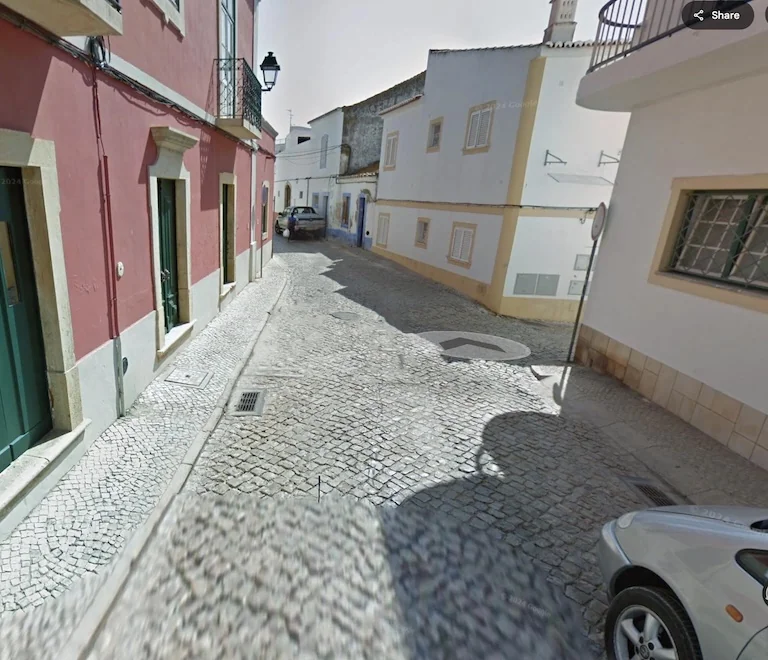
"The picture origin becomes clear when the model notices Portuguese pavement patterns, regional wall colors, and local infrastructure details that do not fit Spain or Italy."
This page sits between two other intents:
So the job of this page is simple: answer the question in the wording users actually use when dealing with pictures.
Upload it and let the model reason from visible clues. This page is optimized for exactly that where is this picture from intent.
No. It also works on private pictures and screenshots that have never been indexed publicly.
Use Where Was This Photo Taken. That page is more location-question focused.
Continue this topic with the most relevant tools, learnable meta guides, and supporting articles.
Upload a photo, picture, or screenshot and use AI to find its likely location from visible clues. Works without GPS metadata, EXIF, or an indexed reverse image match.
Upload a photo, picture, or screenshot and find where it was taken. GeoSolver reads visual clues when EXIF, GPS metadata, or Google Lens matches are missing.
Use reverse image search for location when Google Lens, TinEye, or EXIF fails. Upload a photo and find where it was taken from visual clues.
Master the most reliable meta in Geo Games. A complete guide to identifying countries by their traffic bollards.
Master Google Street View car meta for GeoGuessr. Identify countries by snorkels, roof racks, tape, mirrors, antennas, camera generations, and car blur.
Compare free Picarta alternatives for photo geolocation, screenshots, image location finding, reasoning quality, and pricing.
Grok can analyze uploaded images, but it is not a Google Lens-style reverse image search index. See what works, what fails, and the best workaround.
Our AI analyzes visual clues to estimate where the image was taken
Drag, paste, or click to upload your image